Security Center
Protecting your assets and sensitive data is among our highest priorities. But did you know you also have a critical role to play? Explore educational materials and best practices from our cybersecurity and fraud prevention experts.

Cyber essentials: What to know
Protect your account
E*TRADE from Morgan Stanley uses advanced cybersecurity and fraud prevention tools to help protect your account, data, and assets—and employs world-class talent to lead these efforts. Our cyber defense teams monitor threats, strengthen defenses, and work with industry and government partners to stay ahead of an evolving risk landscape.
How Morgan Stanley protects you
Learn how our layered cybersecurity approach helps defend your account, information, and online experience.
Our digital tools
A few simple settings can add important safeguards, helping you stay informed and act quickly if something seems wrong.
Multi-factor authentication
Add an extra layer of protection at login with multi-factor authentication (MFA). You’ll use a unique six-digit code each time you sign on.
Security alerts
Get instant notifications for transactions in your account, as well as stock, news, and portfolio alerts.
eDelivery
Go paperless with Electronic Document Delivery (eDelivery). Securely access your account statements and trade confirmations online and eliminate the possibility of mail theft.
Trusted contact
Add someone we can reach if we’re concerned about potential fraud or need help connecting with you.
Automatic session timeout
After a period of inactivity, we’ll automatically log you off to help reduce the possibility of unauthorized access to your account.
End-to-end encryption
E*TRADE platforms utilize strong encryption protocols to ensure your data isn’t intercepted or read in transit.
Direct deposit
Get your paycheck and other recurring income deposited directly into your account, reducing the risk of physical checks being lost, stolen, or misplaced.
Zelle®
For Max-Rate Checking clients: When you use Zelle® to send and receive money, your information is protected with the same technology we use to secure your account at Morgan Stanley Private Bank.
How to protect your crypto assets
When it comes to crypto security, simple habits and the right custody structure can help reduce avoidable risk.
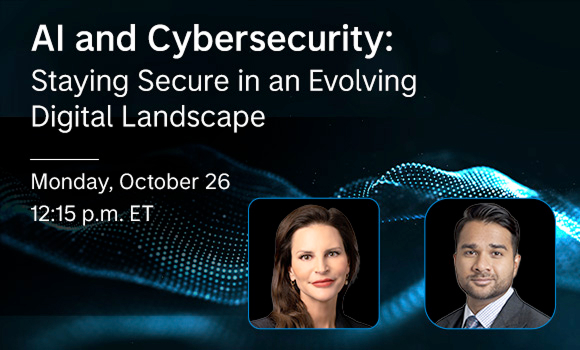
Upcoming webinar: Securing the future
In a world where artificial intelligence is reshaping the digital landscape, the line between reality and deception is increasingly blurred. Join us on October 26 to learn practical ways to help protect yourself.
How we help secure your account
We work behind the scenes to help protect your account every day. In addition to the many ways your assets are protected, the E*TRADE from Morgan Stanley Customer Protection Guarantee means you're not liable for unauthorized third-party use of your account through no fault of your own.1 We'll also never sell your personal information.
Spot and stop scams
Scammers use pressure, urgency, and deception to get people to share information or send money. Knowing the warning signs can help you pause before something goes wrong.

-
- Unexpected contact
- Urgency
- Pressure to maintain secrecy
- Requests to bypass normal procedures
- Use of unusual payment methods (crypto, gift cards)
- Too-good-to-be-true offers
- Asks for sensitive information (Social Security numbers, passwords)
-
- Avoid clicking links in unsolicited emails, texts, or pop-ups
- Don’t give anyone remote access to your devices
- Hang up on unexpected callers asking for sensitive data and call back using a verified phone number
-
- Stop communicating
- Secure your accounts
- Contact your financial institutions
- Monitor your accounts
- Report the scam
- Preserve evidence
Scam spotting 101: Know the signs
5 ways to spot a scam
Criminals may use new tools, but the warning signs are often familiar.
Countering scams in the age of AI
AI is a powerful tool for criminals, but it’s also being used to detect threats and fight back.
Ex-NSA hacker's 5 crypto scam red flags
Scammers target cryptocurrency because transfers are fast and typically irreversible.
Top scams to watch out for
Learn the tactics fraudsters use—and how to avoid them.

Spotlight: Tax season scams
Criminals try to steal money and your identity during tax time. Know what to watch for.
Basics of crypto scams
Crypto scams are evolving fast. Learn the red flags to help protect your assets.
Common scams
Learn how common scams work, what warning signs to look out for, and how to help protect your personal information and money.
How do you spot an investment scam?
At first, the investment may seem legitimate. You may receive professional-looking documents, account statements, websites, or testimonials. In some cases, scammers allow you to withdraw a small amount of money early to build trust. Then they pressure you to invest more. When you try to withdraw larger amounts, you may be told you must first pay taxes, fees, or penalties before your money can be released.
Key warning signs
- A phone call, text, email, social media, or online ad promoting an investment that sounds unusually attractive
- Promises of “guaranteed” returns, “risk-free” profits, exclusive access, or a limited-time opportunity
- Crypto, foreign exchange trading, private funds, real estate, precious metals, or fake trading platforms that appear to show your money growth
How to protect yourself
Be wary of investments promising high returns with little or no risk. Before sending money, independently verify the person, firm, and opportunity using contact information you find yourself. Never share account credentials, one-time passcodes, or personal financial information in response to an unexpected offer. If you feel rushed, pressured, or asked to keep the opportunity secret, stop and seek a second opinion from a trusted financial professional.
How can you spot a romance scam?
Romance scammers often pose as military service members, international workers, or widows or widowers on dating apps, social media, or other online platforms. After building trust through personal stories, photos, and promises of a future together, they may request money for an urgent expense, such as medical bills, travel, or a family emergency. Some may also encourage you to invest in crypto or another “exclusive” opportunity.
Key warning signs
- Friendly or flattering messages from someone who appears interested in building a relationship quickly
- Quickly building trust and emotional dependence
- Claiming to be traveling, deployed, working overseas, or otherwise unable to meet
- Moving the conversation to a private messaging app to avoid detection
How to protect yourself
Do not send money, share account access, or provide sensitive information until you’ve independently verified the person’s identity and intentions. Remember that meeting in person or connecting by video does not guarantee legitimacy, as scammers can manipulate audio, video, and images. Before sending money or investing, seek a second opinion from someone you trust.
How do grandparent scams work?
The scammer may impersonate a relative, like your grandchild, using deepfake audio and personal details found online, or pose as an attorney, police officer, or doctor speaking on your relative’s behalf. They may demand payment by wire transfer, gift cards, crypto, payment app, cash delivery, or courier pickup, while pressuring you to act quickly, remain on the phone, and keep the situation secret because it’s embarrassing, confidential, or legally sensitive.
Key warning signs
- An urgent call, text, or email claiming your loved one is in trouble and needs money immediately
- A frightening story involving an arrest, injury, hospitalization, travel emergency, or legal trouble
- Emotional language designed to create fear and prompt you to act before verifying the story
- Pressure to respond quickly without contacting your loved one or another trusted person
How to protect yourself
Hang up on suspicious calls and contact your loved one directly using a known phone number. If you can’t reach them, ask another trusted relative or friend to verify the story. Don’t share personal or financial information, and consider creating a family safe word to confirm emergency requests.
What are peer-to-peer payment scams?
Payment app scams use fake requests, overpayments, marketplace deals, or account alerts to trick users of Zelle, Venmo, PayPal, and other peer-to-peer services into sending money.
Key warning signs
- A payment request from an unfamiliar vendor or an account that appears to belong to someone you know
- A seller asking for payment before you receive an item
- A buyer claiming they overpaid and asking you to return the difference
- Pressure to return a mistaken payment that may later be reversed or found to be fraudulent
- Instructions from someone claiming to represent your bank or payment app to move money to a “safe” account
How to protect yourself
Treat payment app transfers like cash and send money only to people you know and trust. Confirm unexpected requests through a separate, trusted channel, and carefully check the recipient’s username, phone number, or email before paying. Don’t send refunds or move money to a “safe” account based on unexpected instructions.
How do tech support scams work?
Tech support scams occur when criminals impersonate representatives from technology companies, internet service providers, banks, or internal IT support teams to convince you that your device or account has a security problem.
Key warning signs
- An unexpected call, pop-up, email, or text claiming there’s a virus, suspicious login, unauthorized charge, or security breach
- Alarming language, flashing warnings, or fake error codes urging you to call a “support” number immediately
- Requests to install remote access software, share your screen, or log in to a financial account
- Requests for passwords, one-time passcodes, or payment for unnecessary repairs, subscriptions, or security services
- Search engine ads or customer service websites that appear legitimate but direct you to fraudulent support
How to protect yourself
Don’t respond to unexpected tech support messages or call the number provided. Only grant remote access if you contacted the company through a verified support channel, and never share passwords, one-time passcodes, or financial information. If you’re concerned, end the interaction, close the browser window, and contact the company directly using its official support information.
How can you spot a lottery or prize scam?
Lottery and prize scammers may pose as representatives of lottery organizations, sweepstakes companies, prize agencies, well-known retailers, or attorneys who claim they can help release your winnings.
Key warning signs
- An unexpected message claiming you’ve won a prize, lottery, sweepstakes, grant, vacation, luxury item, or cash award
- Official-looking reference numbers, seals, certificates, logos, or names of recognizable companies or government agencies
- A request to pay taxes, processing fees, shipping costs, insurance, customs duties, or legal fees before receiving the prize
- A check you’re asked to deposit before sending back part of the money for fees or taxes
- Requests for bank account details, your Social Security number, identification (e.g., driver’s license), or account credentials to “verify” your identity or process the prize
How to protect yourself
Be cautious of unexpected prize notifications, especially if you don’t remember entering a contest. Don’t pay upfront or share personal or financial information to claim a prize. Verify the organization independently using contact information from an official source.
What is a government impersonation scam?
Government impersonation scams occur when criminals pose as government agencies or officials and pressure you to share personal information or send money.
Key warning signs
- Claims that you owe taxes, missed jury duty, or have an unpaid parking ticket or toll
- Threats of arrest, fines, lost benefits, or legal action
- Requests to update your voter registration or “verify” your identity to protect your benefits
- Official-looking seals, spoofed phone numbers, or fake government websites
- Threatening language or pressure to act before you have time to verify the claim
How to protect yourself
Pause and verify the claim independently using contact information from the agency’s official website. Don’t use the phone number, link, or website provided in the message. Never share your Social Security number, passwords, one-time passcodes, identification, or financial information with someone who unexpectedly calls or messages, and don’t send payment by gift card, wire transfer, crypto, payment app, or an “urgent” link.
How do charity scams work?
Scammers may pose as well-known charities, disaster relief organizations, religious or community groups, veterans’ organizations, animal rescues, medical fundraisers, or families affected by a tragedy.
Key warning signs
- An unexpected donation request following a disaster, humanitarian crisis, tragedy, or medical emergency
- Emotional stories, urgent language, or photos designed to prompt an immediate donation
- A charity name, website, or fundraising page that closely resembles a legitimate organization
- A copied fundraising page or compelling backstory that may include personal details and photos
- A link, QR code, or unfamiliar payment method that makes donating quick and easy
How to protect yourself
Take a moment before donating, especially if the request is unexpected, urgent, or highly emotional. Look up the charity or fundraiser independently through its official website or a trusted charity evaluation resource, and don’t use a link, QR code, or phone number until you’ve verified it. Be cautious if someone pressures you to donate immediately, won’t provide details, or requests payment by gift card, wire transfer, crypto, or payment app.
How do job scams work?
Scammers may pose as recruiters, hiring managers, staffing agencies, well-known companies, or remote-work platforms. They may also offer consulting, caregiving, personal assistant, or work-from-home opportunities.
Key warning signs
- An unexpected offer for a flexible, high-paying job that requires little experience
- Claims that the recruiter found your résumé online or received a referral
- A rushed hiring process with little or no interview
- Communication that takes place only by text, email, messaging app, or video call
- Requests for your Social Security number, driver’s license, or bank account details early in the hiring process
- A paper or electronic check you receive for equipment or supplies that may seem to clear but is later reversed, leaving you responsible for the funds
- Upfront charges for training, uniforms, background checks, or other job-related expenses
How to protect yourself
Research the company and recruiter independently through the company’s official website rather than using links or contact details from the offer. Don’t pay upfront for a job, deposit checks on an employer’s behalf, or send money back from a check you receive. Wait to share sensitive information until you’ve confirmed that the role, company, and hiring process are legitimate.
How do online shopping scams work?
Scammers may pose as online retailers, resale or marketplace sellers, ticket vendors, delivery companies, customer service representatives, or well-known brands offering popular products at unusually low prices.
Key warning signs
- A product, ticket, or service offered at an unusually low price
- A professional-looking website with countdown clocks, “limited inventory” messages, or questionable customer reviews
- An unexpected delivery or order message claiming there’s a problem or an additional fee
- Requests to click a link, verify your account, or provide payment or personal information
- A website or seller that only accepts payment methods with limited buyer protection
How to protect yourself
Check unfamiliar websites and sellers before making a purchase. Review the website address, read independent reviews, and confirm the seller’s return policy and contact information. Use a payment method that offers buyer protection, and don’t click unexpected delivery or order links. Instead, go directly to the retailer’s or carrier’s official website to check your order.
Strengthen your cybersecurity
Cybersecurity can sound complicated, but it doesn’t have to be. As AI-enabled hacks and scams become more sophisticated, a few smart moves can make you a harder target. Using unique passwords, turning on multi-factor authentication, keeping devices updated, and staying alert to suspicious requests can help protect your accounts, information, and identity.

Your cybersecurity checklist
Cybercriminals don’t need much to cause trouble. Use this checklist to help close common gaps.

What to do if you think you’ve been hacked
Know the steps to take if your identity, accounts, devices, or information may be compromised.
Upcoming webinar: Securing the future
In a world where artificial intelligence is reshaping the digital landscape, the line between reality and deception is increasingly blurred. Join us on October 26 to learn practical ways to help protect yourself.
The fundamentals of cybersecurity
Top 5 cyber tips
Practical steps can help reduce your risk and keep you in control.
Boost your password security
Strong password habits help protect your digital identity.
Multi-factor authentication (MFA)
MFA adds another security step at login, making it harder for criminals to access your accounts.
Hot topics
Navigate an evolving threat landscape.

Risk and volatility in crypto markets
Understand the risks before you trade or invest in cryptocurrency.

AI and cybersecurity: Risks, rewards, and safeguards
Find out how to help protect yourself from AI-enabled scams, deepfakes, rogue AI, and more.
Cybersecurity tips for crypto traders
Practical tips to help safeguard your crypto assets.
Cybersecurity Q&A
Before you scroll on, ask yourself:
Q: Do you reuse the same or similar passwords?
If yes, consider using a password manager to create and store unique, complex passwords.
Q: Do you use MFA for sensitive accounts?
If not, turn it on. Consider using the VIP Access mobile app for your E*TRADE account.
Q: Are your devices set to update automatically?
If you’re not sure, review your device settings. Software updates often patch or fix identified security vulnerabilities.
Q: Do you know what personal data your applications can access about you (e.g., contacts, photos, location)?
Review app permissions regularly and limit access to what’s necessary.
Q: Are your most important files backed up?
Back up critical documents and data to a secure cloud service or external drive—and test that you can restore them.
Safeguard older adults
Older adults are often targeted by scammers and financial predators. Learn how to recognize warning signs and help protect yourself and the people you care about.

How to help protect elders from financial abuse
Financial abuse can affect older adults and often goes unreported. Learn to recognize the signs and help protect yourself and the people you care about.

Cybersecurity for seniors: A 3-step guide for caregivers
Supporting a loved one’s cybersecurity doesn’t have to feel overwhelming. Explore several practical steps to help them stay safer online.
Trusted contact
A trusted contact gives E*TRADE someone to reach if we’re concerned about possible fraud or having trouble getting in touch with you.

Protecting older loved ones from scams
Talking about fraud can be hard. These tips can help make the conversation easier.

Accessible solutions
We provide website and browser accessibility support to help ensure everyone can access and engage with our offerings.
Security tips
Use Electronic Document Delivery (eDelivery)
View and download statements and documents securely online using electronic delivery.
Pay digitally
When appropriate, consider options such as Zelle® for Max-Rate Checking clients.
If you must send a check
- Keep checkbooks secure and lock away blank checks.
- Complete every field and draw lines through blank spaces so no one can add information.
- Mail checks from inside a post office rather than a standalone collection box.
- Review activity regularly and report anything suspicious promptly.
Watch for government impersonation
Scammers may pose as the IRS, Medicare, the VA, or another authority, and pressure you to liquidate retirement assets or move funds to a “safe account.” Verify the request independently, especially if you’re pressured to act quickly.
Confirm payment change requests
Contact the appropriate organization directly using a trusted phone number or official website—not a number or link provided in the request—about any request to redirect retirement distributions or benefit payments, especially if it involves urgency or secrecy.
Secure financial accounts
Use strong, unique passwords, enable multi-factor authentication (MFA), and turn on account notifications to monitor activity.
Keep your family safe
Marriage, kids, blended families, travel, and shared devices can all change how your household manages security. Use these resources to help protect your family’s accounts, information, and financial well-being.
5 steps for keeping your kids cybersafe
From streaming to social media, here are a few ways to help your kids build safer online habits.

3 ways to help keep your phone safe
Your phone is a gateway to your personal and financial information. Help your family protect theirs.

Smart money moves when traveling abroad
From using your own personal hotspot to paying with a credit card abroad, get tips on protecting yourself from fraud while traveling.

4 ways to stay cybersafe on vacation
Find out what to do before you leave, at the airport, and at your destination to stay cybersafe
Ways to strengthen cybersecurity for your family
Simple steps can help protect your family’s digital life and what matters most. Here are some practical ways to get started.
1
Share access safely
Make sure trusted household members have appropriate access to shared accounts, devices, and key documents. Use a family password manager instead of sharing passwords.
2
Create a family safe word
Agree on a private phrase family members can use to verify requests for money, information, or account changes.
3
Keep social media private
Remember that the internet never forgets, so limit what you share publicly. Scammers may read your posts to make impersonation attempts more convincing.
4
Encourage openness
Talk regularly about suspicious messages, online relationships, and unexpected financial requests. Bad actors often pressure people to keep conversations private.
5
Protect estate and family documents
Keep wills, powers of attorney, insurance records, and account information in a locked location.
6
Secure your home network
Use a strong Wi-Fi password (not the default password that came with the router) and consider a separate guest network for visitors.
Report an issue or concern
Contact E*TRADE immediately at 800-387-2331 if you:
- Believe you are a victim of identity theft or fraud
- Suspect your phone or email have been compromised
- Notice suspicious account activity
- Receive a questionable email that looks like it is from E*TRADE or one of our affiliated companies
- Accessed E*TRADE through a search result or link and believe the website may not have been etrade.com, or you may have accessed your account through a lookalike website
To report a website vulnerability, please go to Morgan Stanley’s Responsible Disclosure.
Contact us 24 hours a day
For all inquiries for E*TRADE or Morgan Stanley Private Bank, call 800-387-2331.
From outside the US, call +1 678-624-6210.
Important links
Frequently asked questions
-
The Customer Protection Guarantee is our pledge to protect E*TRADE clients from losses due to unauthorized activity that takes place in your Self-Directed Account(s) through no fault of your own.
However, you understand and agree that you need to take measures to protect and keep your Access Means* and account information confidential, and to notify us immediately if you suspect or become aware of unauthorized activity in your account(s), that your Access Means or account information may be compromised (including if you think you accessed your account through a lookalike site), or that any of your personal devices or accounts at other financial institutions have been compromised.** Failure to immediately notify E*TRADE of unauthorized account activity or known or suspected compromise of your Access Means, account(s), or personal device(s) (including compromises of accounts at other financial institutions) may result in denial of your claim.
*As defined in your E*TRADE from Morgan Stanley Client Agreement for Self-Directed Accounts, the term “Access Means” shall mean any logon, user ID, password, or authentication device by which you may access your Self-Directed Account, account features, or the Service, whether provided by Morgan Stanley or any third party.
**Nothing in the Customer Protection Guarantee is intended to limit any right conferred or claim or protection provided to any party under Federal Law (such as Regulation E) or state law, as applicable.
-
The Customer Protection Guarantee only extends to your E*TRADE Self-Directed brokerage Account(s) and Morgan Stanley Private Bank, National Association deposit accounts. The Customer Protection Guarantee does not cover any other accounts, products or services provided by Morgan Stanley or any third parties that you obtained through Morgan Stanley, including without limitation any full service brokerage accounts, insurance accounts, annuities, 529 plans and digital asset accounts.
-
-
We will investigate your claim* to determine the applicability of the Customer Protection Guarantee and we may restore applicable losses in your account(s) based upon an investigation of the facts of your claim.
As permitted by law, we may ask for your cooperation with any investigation we undertake regarding any claim you file pursuant to the Customer Protection Guarantee. Such cooperation may require you to take additional steps to assist us, including but not limited to, measures to detect and/or sanitize your personal computer(s) and/or device(s), file a police report or other reports with governmental authorities, provide an affidavit regarding the unauthorized activity in the Self-Directed account(s), aid in the recovery of any losses in the Self-Directed Account(s), and sign a release or other legal documents before restoring your Self-Directed Account(s).
*Nothing in the Customer Protection Guarantee is intended to limit any right conferred or claim or protection provided to any party under Federal Law (such as Regulation E) or state law, as applicable.
-
For your E*TRADE Self-Directed Brokerage Account(s), the Customer Protection Guarantee covers eligible losses including changes to account balances or equity due to unauthorized activity that results through no fault of your own. Losses do not include any tax consequences, legal fees, lost opportunity costs, consequential or non-monetary damages, or other amounts which may have been reimbursed or are eligible for reimbursement from another source.
For your Morgan Stanley Private Bank Account(s), the Customer Protection Guarantee covers eligible losses including increases in your outstanding loan balance at the time of the unauthorized third-party access and any additional interest accrued as a result.
You are responsible for reviewing your account statement(s) and transaction confirmations for your E*TRADE Self-Directed Brokerage Account(s) immediately on receipt and for timely notifying us of any suspected or actual unauthorized activity in your account(s). You are also responsible for immediately notifying us if you suspect or have knowledge that your Access Means, account(s), or personal device(s) have been compromised, including of any account compromise at another financial institution. Failure to immediately notify E*TRADE of known or suspected unauthorized account activity or compromises of Access Means, account(s), and personal device(s) (including accounts at other financial institutions) may result in denial of your claim.
-
Never share your User ID and password with anyone. If you share your Access Means or account information or grant another person access to your account(s), you are responsible for the activities conducted by such persons in your account(s) and all such activity will be deemed authorized by you. The Customer Protection Guarantee only covers activity that is not authorized by you through no fault of your own.
-
If you share your Access Means or account information with anyone or authorize account access through a third party (not including Morgan Stanley affiliates or Aggregation Services through Total Wealth View) and that third party access leads to any loss in your account, the Customer Protection Guarantee may not apply.
By authorizing an aggregator or other third party to access your account information, the aggregator or other third party, as well as their employees, agents, and other third parties with which the aggregator transacts business, will be considered authorized persons and any activity conducted in your account(s) as a result of sharing your Access Means or account information with the aggregator or other third party will be considered authorized activity in your account(s) and thus may not be covered by the Customer Protection Guarantee.
The designated and exclusive account aggregator for E*TRADE and Morgan Stanley is Total Wealth View powered by Yodlee.
-
Always access your account by typing etrade.com directly into your browser or using a saved bookmark. Do not log on through search engines or links in emails or text messages, as these may direct you to a fraudulent lookalike website designed to capture your Access Means. If you believe you have accessed your E*TRADE account through a lookalike site, contact us immediately.
For more information, please visit the E*TRADE Security Statement.
-
-
Multi-factor authentication (sometimes called two-factor authentication) adds an extra layer of security by requiring a second form of verification—such as a security code from an authenticator app—when you log in.
You can use your mobile device for an extra layer of security at E*TRADE by downloading the free VIP Access mobile app to your device. Learn more.
-
Security alerts help you monitor your account in near real time, so you can spot and respond quickly to suspicious activity.
You can choose alerts such as:
- Money movement activity
- Trade-related notifications
- Stock market symbol alerts
- Other account alerts
To manage alerts and delivery preferences, log in, go to your Profile, open Alerts, and then update your Delivery Settings.
-
No. E*TRADE will not sell your personal information to third parties or marketers for any purpose. See our U.S. Privacy Policy and Notice to learn more.