Power E*TRADE option chain customization
E*TRADE from Morgan Stanley
The option chain on Power E*TRADE and Power E*TRADE Pro is designed to be more than a static list of contracts; it’s an interactive workspace that traders can customize to match how they analyze and build trades. From adjusting strike spacing and expiration views to reformatting the chain into specific spread types, the platform allows users to shape the chain around their trading style and approach. These customization features can help traders work more efficiently, and move from analysis to execution with greater clarity. Below, we will explore how to navigate the option chain on Power E*TRADE Pro.
From the Tools menu, select Options and enter a stock ticker symbol or stock name. The option chain will list all available option series and contracts for a given security. To begin, input a symbol into the entry field on the upper left corner of the tool, or use the Symbol Linking button to populate a symbol being viewed in other linked tools.
The default organization of the option chain will display calls on the left side, puts on the right, with tradeable expiration series and available strikes in the middle. Above the option chain there will be a selectable listing of various expiration series, which are the contract expirations that are currently tradeable. Click on the desired series to add it to your option chain, and refer to the Strikes dropdown menu to select how many strikes you wish to display on the option chain, as well as the Near box to view strikes surrounding a selected price.
Chain styling
To modify the column headers or organization of the columns, click on the slider icon button on the upper right corner of the tool to access the Chain Styling menu then choose Select Columns. From the Column Selection window, click the plus sign to the left of each header to add the header to the current column set; click the red X to the left of each header to remove from the current column set. To rearrange the order of the option chain headers from the current column set, click any header, drag and drop into the desired order.
Also within the Chain Styling menu, you can find a handful of other customization options such as if the column headers mirror alignment on both the call and put side, if the scroll is locked or move independently, and if non-standard option series are displayed. Additionally, you can select to show Implied Volatility (IV) Constellation, which plots at-the-money implied volatility by expiration versus the 30 day rolling average, and displays the results as a percentage.
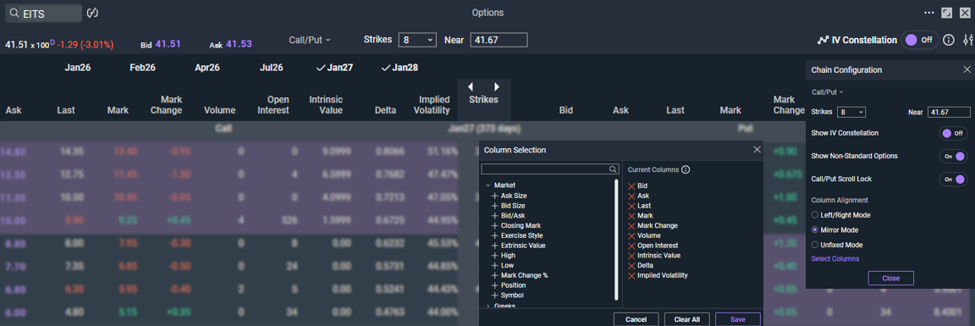
Fig 1. Customization choices on a default Call/Put option chain
Spread display
If you frequently trade a specific option spread strategy, or you’re trying to identify different opportunities, you can choose to set the options chain to display the spreads you prefer, such as Strangles, Verticals, Diagonals, Butterflies, and Iron Condors. Once the spread strategy has been selected, to the right of the spread menu is a toggle to select if you wish to see the spreads in terms of either strikes or dollar prices, and a menu to select the amount of strikes to display in the option chain, or near to a specific strike.
In the example below, Vertical has been selected as the type with a width of five. Notice that the calls are still on the left and the puts on the right, but now the strike prices down the middle are shown as five strike wide spreads based upon the customized settings.
To trade or analyze one of these spreads, simply click the purple bid or ask prices. Simply click on a bid price on the desired call or put side to access an order ticket for a prebuilt for a sell order on the according strike price; click on an ask price for a prebuilt buy order.
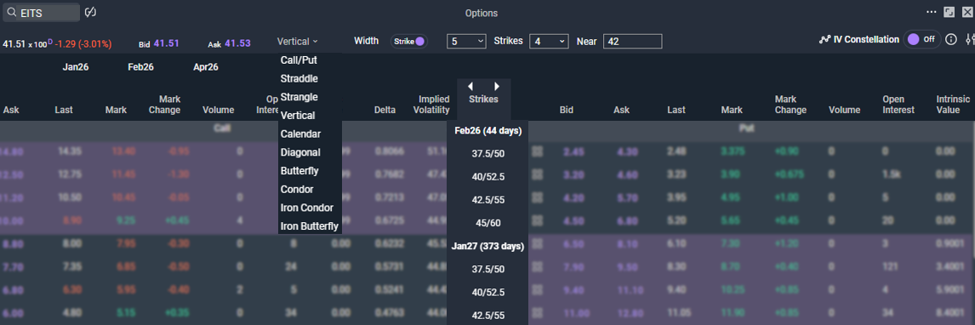
Fig 2. A five-strike-wide vertical spread option chain
Next, we will take a look at a few analysis tools available from the Order ticket, Snapshot Analysis and TradeLab. When used together, these tools can help traders better understand potential outcomes of a hypothetical trade and align options strategies with their market outlook and risk tolerance before placing a trade.